How to Mail Letters or Invoices Internationally
The internet and cloud services have created new opportunities for businesses to reach international markets. As a result, more companies are expanding beyond their home countries. To successfully grow internationally, they need a reliable way to deliver invoices and other important documents across borders. According to the latest statistics, USPS international services reach more than 180 countries and territories worldwide. USPS also offers multiple international mailing options, including First-Class Mail International, Priority Mail International, and Priority Mail Express International.
.Mailing documents to foreign countries has turned into an essential task to keep businesses running and to maintain their cash flow. But for most business owners, it can be complicated trying to mail invoices or important documents internationally through the US mail.
Why?
Because most of us do not even know how the process works, so we spend valuable time investigating through the post office so we can get this task done.
To make your life easier, here are two different ways that you can mail letters or documents to foreign countries. Here you’ll find some steps to follow and get your international letter, invoice, or document out the door.
“First Class Mail International” is the most affordable mail class to send letters or documents. If you're unsure whether USPS delivers to your destination or want to review country-specific mailing requirements, consult the USPS Individual Country Listings.
There are two common ways to send business documents internationally:
- Visit your local USPS Post Office and purchase international postage.
- Use an online mailing service like DocuSend that prints, prepares, and mails your documents through USPS without requiring you to leave your office.
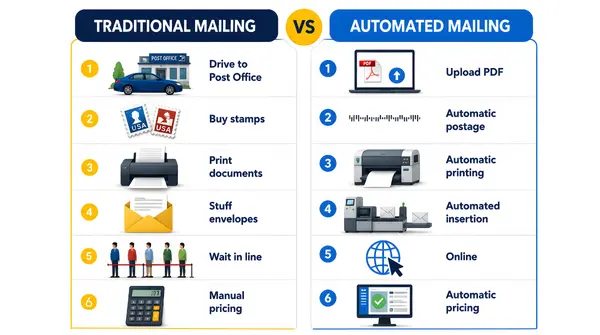
The Traditional Way
- Write the letter or prepare your invoice document.
- Buy a stamp (you can buy it online or get in line to buy one at any authorized post office).
- Go to the local post office.
- Weigh your letter (prices vary depending on weight).
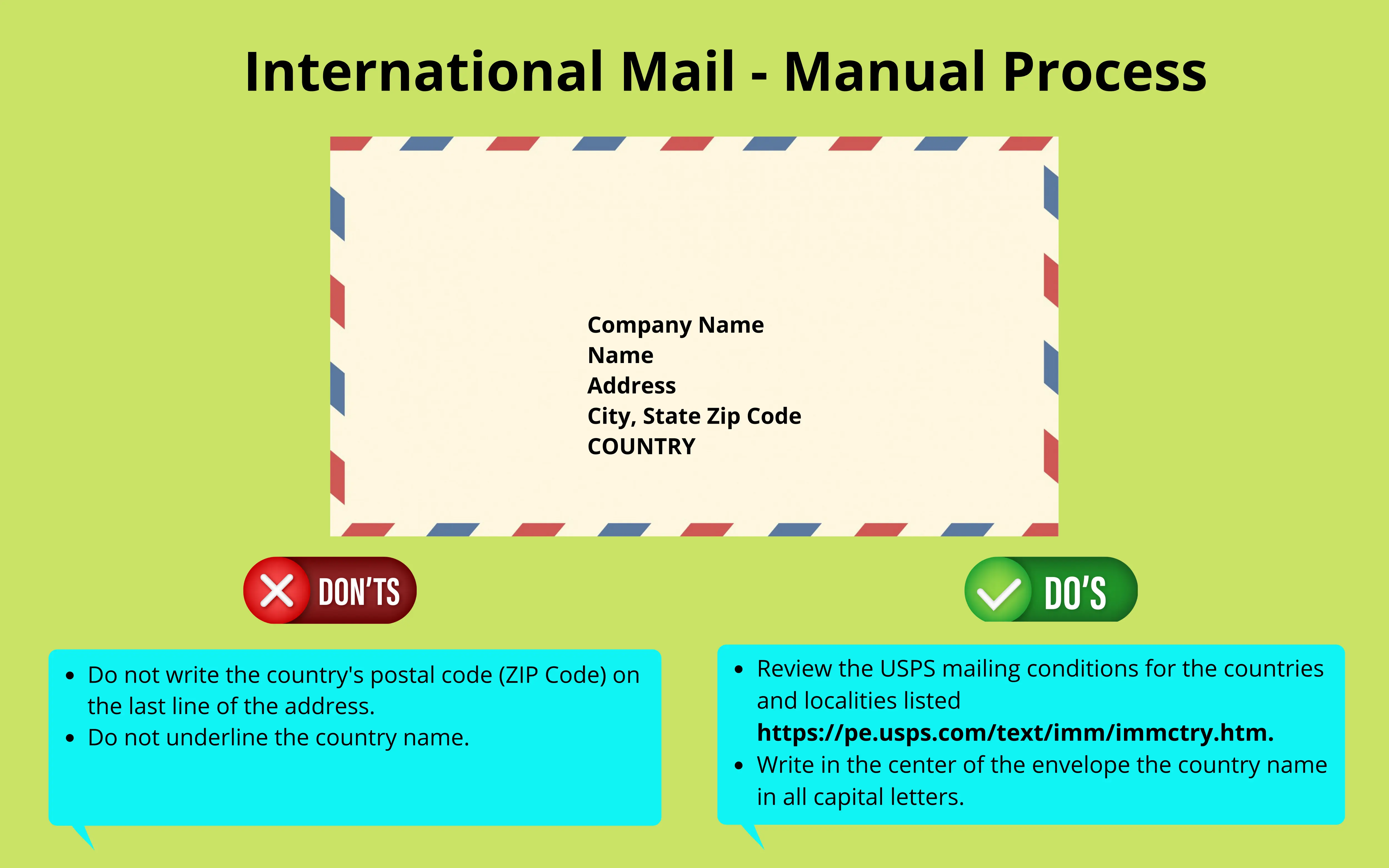
- Prepare your envelope with the proper address format:
The Modern and Automated Way to Mail
Automated mailing is not only hassle-free for you, it also helps the environment by reducing vehicle use. (Imagine if everybody used this method?) Reducing unnecessary travel to the post office contributes to lower fuel consumption and reduced carbon emissions.
How to mail invoices through US mail without leaving your desk
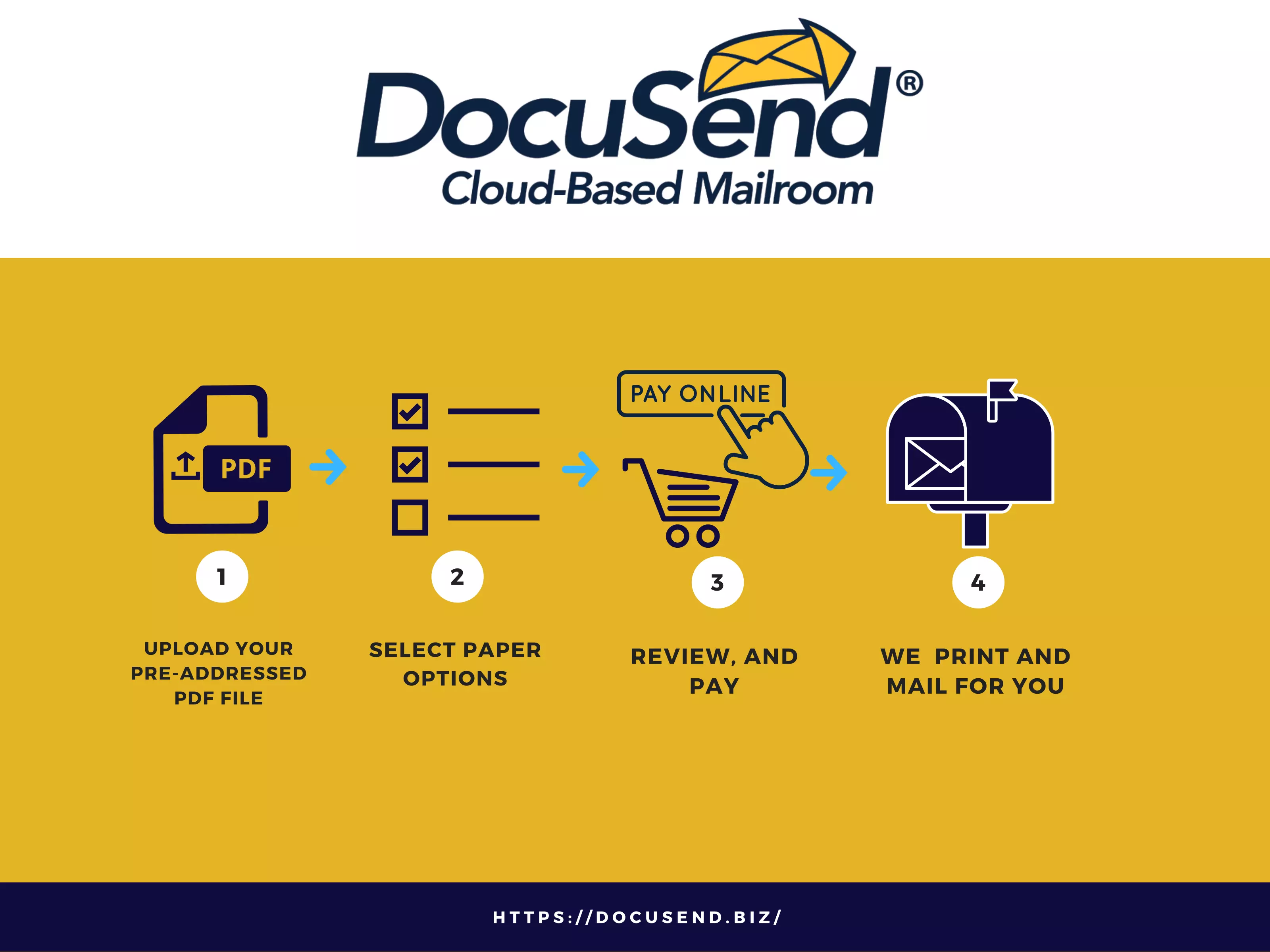
Follow these steps:
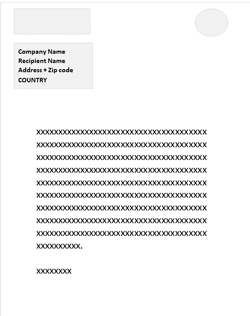
- Create a preaddressed PDF.
- The name of the foreign country should be on the last line of the address block.
- Your file should contain a mix of both USA and foreign addresses. We identify the foreign addresses and assess additional foreign postage. (Note: Please contact DocuSend if your file contains only foreign addresses.)
- For USA addresses, do NOT list the country.
- Upload the PDF to DocuSend:
- Click on this link https://docusend.biz/UploadPDF.php
- Select the option Include or Do not Include Remittance Envelope.
- Then click Upload PDF File.
- Review and add to your shopping cart.
- Process payment. (There is no contract or minimum number of documents to mail.)
Documents are printed out and mailed via the USPS within two business days.
Very simple, right?
It’s faster than buying a stamp!
Whether you're mailing one invoice or thousands of documents, automated mailing eliminates repetitive manual work and maintains a consistent mailing process.
The New Method Brings New Advantages
If you send your invoices and other customer communications faster, you can get paid faster. As you can see, an automated mailing process eliminates many steps and significantly speeds up the flow of your correspondence. It takes only a few clicks to upload documents, identify the address locations on the screen and select the needed features; and at most two minutes to review the uploaded files and process payment. You can send your documents right after creating them with your software and will not need to take much time away from your normal work process.
The cloud-based technology frees you up from time-consuming manual printing and stuffing envelopes and eliminates weighing your letters or invoices in order to calculate the shipping cost. The additional foreign postage rate of only $1.40 per one-ounce envelope is standard regardless of the destination country. The final price is calculated automatically and displayed after the upload, and it already includes the cost of all postal materials. Best of all, it is less than half compared to traditional print and mailing costs. It’s a really cost-saving solution for businessеs.
Overcoming Limitations
To simplify the mailing process, DocuSend automatically identifies potential mailing issues, including insert limit violations and unmailable addresses, and keeps users informed throughout the process. This is especially helpful when a business sends numerous documents to different countries. Speaking of limits for the number of sheets, this service lets you send more pages while staying within the restrictions with a two-sided printing option. Mail to addresses outside the USA is only up to one ounce, which is the equivalent of 4 sheets. Sometimes you have a document slightly bigger than the USPS allows, and you think it would be great to fit it into one envelope. Selecting DocuSend’s Duplex printing feature, you can mail up to 8 pages. If you are adding a flyer, it is possible to make it two-sided too. Using duplex printing is a great cost-saving tip in general.
Mailing to the US from Other Countries Made Simple
For international customers who need to send mail to the USA. using DocuSend for that is the best strategy. This method completely eliminates cross-border transportation of physical mail pieces, with all its weight restrictions and extra time spent. Your documents don't have to physically go through international borders, which means foreign postage charges are eliminated. You can upload from anywhere, and your documents are printed and mailed in the US. And the maximum number of sheets is the same as for domestic US mail.
DocuSend Has Features for Every Small Business’s Needs
You can select the specifications you need, including color or black printing, plain or perforated paper, adding a generic flyer, one- or two-sided printing, and the HIPAA compliancy feature to avoid personal data retention. DocuSend is very flexible. It works for any template and can be integrated with any accounting software. If you are sending a small number of invoices and not doing it regularly, this service is just what you need, as it has no monthly minimums or contracts, and you pay only for the documents you are going to send. Besides that, it does not require downloading any software.
Businesses that generate invoices from accounting software or ERP systems can also integrate directly with DocuSend using its REST API, allowing documents to be mailed automatically without manual uploads.
The Bottom Line
Sending one personal letter abroad every now and then is usually straightforward. But when your business needs to send dozens or hundreds of international documents, every extra step adds up and can consume valuable time. Moving the process online speeds it up and is a great solution for your business. Whether you're mailing a single invoice to Canada or hundreds of business documents across multiple countries, doing it online will improve efficiency and save you both time and costs.
With cloud-based automation, organizations can mail important documents to more than 180 countries with a few clicks without leaving the office.