How to Certifiably Gain a Professional Edge: Send Certified Mail Online in Minutes
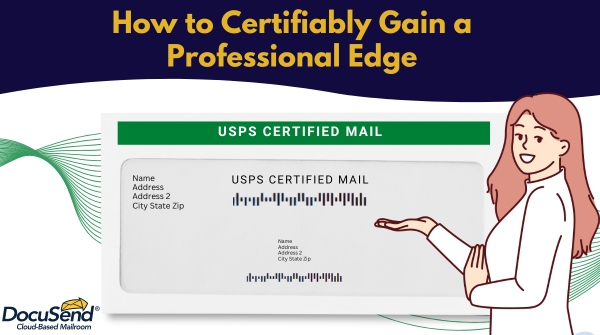
When you have something important to mail and need to be absolutely certain – and be able to prove if necessary – that it reached its destination, USPS Certified Mail provides documented proof of mailing and delivery. Unlike regular mail, Certified Mail includes tracking and delivery confirmation. When the mail carrier delivers the letter, the recipient or someone authorized at the delivery address may be required to sign for it, creating a record that the item was delivered. If delivery cannot be completed, USPS records the attempted delivery and provides status updates through its tracking system.
This is why Certified Mail has long been a trusted choice for sending important documents where proof of delivery matters.
What Documents Can You Send with Certified Mail?
Whether you're sending legal notices, contracts, compliance documents, financial statements, medical correspondence, government forms, collection letters, or confidential business documents, Certified Mail is an excellent choice, as it allows you to track the mailing process and provide documentation of delivery or attempted delivery when needed.
Why Businesses Are Moving Away from Traditional Certified Mail
For years, businesses had only one option to handle Certified Mail: Drive to the Post Office and stand in line. Complete paperwork, keep paper receipts, repeat… Every piece of certified mail used to be time-intensive – it takes time to print, fold, stuff envelopes, apply postage, travel, stand in line, fill in forms…
Those minutes can add up to hours every month. Even worse, these repetitive tasks keep employees away from higher-value work, an especially important consideration for a growing business.
Stop Wasting Time at the Post Office
Imagine never having to print another mailing label, stuff another envelope, or organize another stack of mailing receipts. Instead, imagine just being able to upload your PDFs, click Submit, and let an automated solution take care of the rest. It's the modern, faster, and more efficient way.
Now you can send certified mail as easily as sending an email, while still receiving the same USPS Certified Mail service, legal recognition, and physical delivery as traditional Certified Mail.
How to Send Certified Mail Online in Minutes
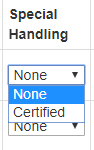
Just print each document to a PDF file and upload them to the DocuSend website. Then go to Review Individual Documents and select “Certified” under the Special Handling dropdown menu.
Here is how it works step-by-step:
Step 1. Save Your Document
Export your document as a PDF.
Step 2. Upload
The online mailroom works from any desktop with internet connection. There are no minimum document requirements, so you can mail time-sensitive communications anytime you need to, right after creating them, even if it’s only one piece. Upload one document or thousands to your DocuSend account. DocuSend handles the job the same way, whether you're mailing a single invoice or important legal notice or a large batch of customer statements.
Step 3. Select the Mailing Address Area
Step 4. Select the Certified Mail Option
Open Review Individual Documents and choose Certified Mail from the Special Handling menu.
Step 5. Review your order and approve
Select the preferred specifications, click Submit and process online payment by choosing the method that is most convenient for you.
That's it – you're done!
Your documents are automatically printed, folded, inserted into envelopes, sorted and sent through USPS Certified Mail. Addresses will be validated using address verification software and compared against the National Change of Address (NCOA) database. This reduces the risk of undelivered communications in cases where the recipient has moved and their address has changed.
Automatic USPS Tracking Included
One of the biggest advantages is visible and convenient digital tracking.
The tracking number for each of your documents will be posted on your DocuSend portal at the time it is processed. You can monitor every mailing, verify delivery status, maintain digital records, and access proof of mailing without keeping paper receipts. It’s much more efficient to manage and track your sensitive correspondence from a single digital location.
Why It’s the Fastest, Easiest Way to Mail USPS Certified Documents without Going to the Post Office
To sum up, here are the inconveniences you will be avoiding by using an online mailing service:
Companies that send Certified Mail from the Post Office:
- Trips to the Post Office to acquire the Certified Mail forms
- Manually writing all the required information on the forms
- Removing the form backing and placing it on the required area of the envelope
- Storing receipts for physical documentation
Companies that use internal resources for certified mailing:
- Meter rental service fees
- Meter reset fees
- Meter ink costs
- Weight scale cost
- Material costs including paper and envelopes
- Manual labor to print, fold, stuff, seal, and apply postage
Traditional Certified Mail vs. DocuSend Comparison
Hidden Costs of Mailing Certified Letters Yourself
When you mail in-house, behind every envelope is a chain of small tasks.
A simple human mistake, like an outdated address, a missing page, or an error during processing, can turn into a much bigger problem. The letter may need to be prepared, printed, and mailed again, which means extra postage costs, more employee time spent fixing the issue, and additional delays. When the document is time-sensitive, even a few days of delay can affect deadlines. And the larger your mailing volume, the more difficult it is to control all the small inefficiencies. An online mailroom helps reduce the total cost by lowering material and postage expenses through bulk pricing while improving accuracy and saving time and administrative effort.
Why Businesses Choose DocuSend
Online mailing services often require you to register and pay monthly fees. DocuSend doesn’t. Businesses pay only for what they send, with no monthly subscription fees, and no software to purchase and install.
Documents are uploaded securely through a cloud-based platform. You can choose the HIPAA option if your business requires this level of compliance.
- Because there are no minimum mailing volume requirements, it makes the service accessible for businesses of all sizes, from small startups to large enterprises. Whether sending a single letter or thousands of pieces, this online mailroom easily scales with your changing mailing needs.
- Law firms
- Property management companies
- Financial institutions
- Healthcare providers
- Insurance companies
- Government agencies
- Collection agencies
- Utility companies
- Human Resources departments
- Accounting firms
Businesses and Organizations That Rely on DocuSend for Certified Mail
The service is widely used by organizations that rely on certified mail for compliance, customer communication, and sensitive document delivery:
The reason this method can help your company gain a professional edge is that it will help you operate with more speed, reliability, and control. It lets you achieve faster response times; a more professional customer experience through timely, accurate, and reliable communication; and, of course, better use of your employees’ time.
Once you’ve used us as your cloud-based mailroom, we're sure you'll never go back.
Frequently Asked Questions
What types of mail require Certified Mail?
USPS Certified Mail is commonly used for legal notices, compliance documents, contracts, and other important communications requiring proof of mailing and delivery.
Can I send multiple Certified Mail documents at once?
Absolutely. Upload one document or thousands, and DocuSend processes them automatically.
Do I need special mailing equipment?
No. Everything is handled by DocuSend's automated mail production system.
Will I receive tracking information?
Yes. USPS tracking numbers are automatically posted to your DocuSend portal for every Certified Mail piece.
Does online Certified Mail have the same legal validity as traditional certified mail?
Yes. Online certified mail provides the same legal proof of mailing and delivery as traditional certified mail because the mail piece is processed through the USPS using the same delivery network.
Start sending Certified Mail online today and experience the easiest way to mail important documents without ever leaving your office.