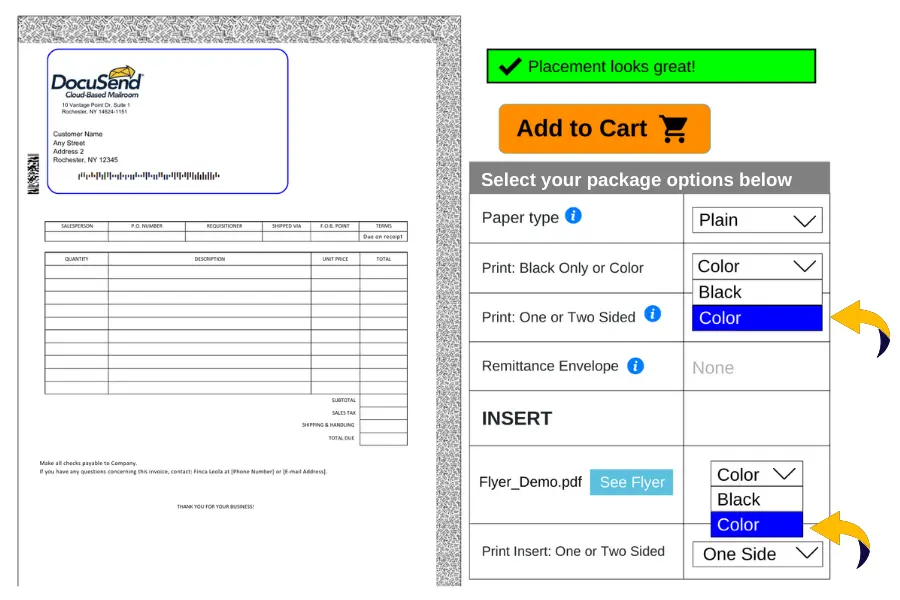
How to Select Color Printing in DocuSend
- Upload your PDF file.
- Select Color Printing in the Mailing Options panel.
- If uploading an insert, choose Color after the insert is added.
Color plays an essential role in how invoices, statements, and business documents are recognized. Printing in color is a functional tool, not a decoration – it’s used to improve readability, highlight critical information, and reinforce brand identity across all shared documents.
Color improves clarity and speeds payment decisions.
Color reduces cognitive load in data-heavy documents.
| Factor | Color Documents | Black-and-White Documents |
|---|---|---|
| Visual Appeal |
High
Grabs attention and creates a strong first impression |
Moderate
Less visually striking, may appear generic |
| Perceived Value |
Higher
Associated with professionalism and importance |
Lower
Can feel less premium or urgent |
| Engagement Level |
Increased
Enhances readability and emotional connection |
Reduced
Limited ability to highlight key points |
| Open Rate |
+20–30%
Based on marketing performance studies |
Baseline
Standard open rates |
| Information Retention |
Better
Improves memory recall and comprehension |
Lower
Harder to emphasize critical details |
| Brand Impact |
Strong
Reinforces brand identity and professionalism |
Weak
Minimal branding impact |